Building an AI-Powered Agent Chatroom with LiveKit and React
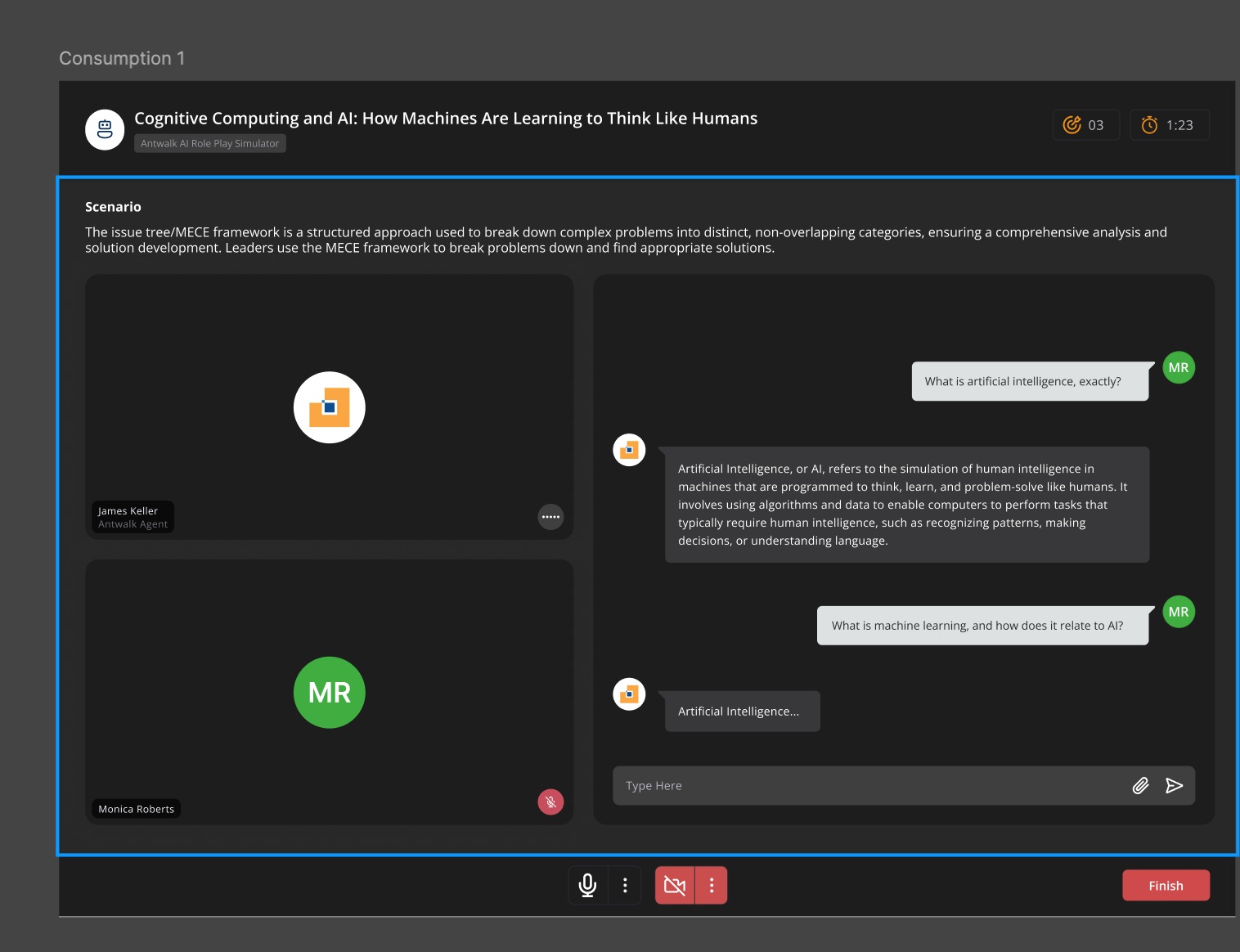
In today’s world of real-time communication, blending human interactivity with artificial intelligence creates a powerful user experience. Recently, I had the opportunity to build a unique project for a client — a real-time, audio-based AI Agent Chatroom powered by LiveKit, built entirely using React (Vite) on the frontend and Python on the backend.
This blog post is a walkthrough of how I brought this experience to life.
The Problem Statement
The client needed a solution where users could:
Join a virtual room in real-time
Interact with a voice-based AI Agent that speaks and transcribes
Customize the AI behavior dynamically (e.g., Sales Rep, Loan Agent, etc.)
Run seamlessly on modern browsers with good UX and minimal latency
Think of it like a real-time version of a virtual meeting — but instead of another human, you're talking to a smart, contextual AI assistant. Similar to how a virtual sales consultant or a bank representative would assist customers online.
The Tech Stack
Here’s a quick rundown of the tools and frameworks that made it all possible:
Frontend: React + Vite
RTC & Audio: LiveKit SDK
Backend: Python (with AI integration APIs)
Transcription & Data Sync: WebRTC DataChannel + AudioTrack hooks
Deployment: Self-hosted LiveKit server
How It Works (Project Overview)
When users join the room:
A connection is established to a LiveKit server using a JWT token.
The user's microphone is enabled (video optional), and audio begins streaming.
An AI agent — running on the backend — listens to the audio stream, processes it using NLP models (like GPT, Whisper, etc.), and responds with voice + transcribed text.
The frontend renders the audio visualization, transcription, and context like “Scenario”, “Agent Persona”, etc.
The conversation and behavior of the AI is controlled through a template system, making it reusable across domains like sales, banking, or education.
Unique Features
Configurable Agent Templates
Each room is bootstrapped with a different AI personality — a sales agent, a financial consultant, or even a tech support bot — using configurable templates.Audio-Only Mode with Visualization
Users see the agent’s avatar and speech transcription in real time, giving a clean and distraction-free UX.Modular Connection System
I created a reusable hook for managing LiveKit connections (useConnection) supporting cloud, manual, or environment-based modes.Sleek UI with Dark Mode
Thanks toFramer Motionand Tailwind, transitions feel smooth and modern.
Challenges Faced
Syncing voice responses with LiveKit’s audio tracks was tricky — especially when coordinating transcription with response timing.
Managing real-time disconnects and reconnections gracefully.
Ensuring consistent agent behavior across sessions with dynamic templates.
What’s Next?
The client is planning to scale this platform further:
Adding support for video avatars and emotional tone detection.
Storing conversation histories for future training and improvement.
Extending this platform for recruitment interviews and training simulations.
Final Thoughts
This project truly showcased the power of combining real-time media with AI agents. Tools like LiveKit make it incredibly easy to build scalable RTC apps, and layering AI on top opens up countless use cases.
If you’re building something in the AI + WebRTC space and want to collaborate or learn more — feel free to connect!
About the author
Hey there! I'm a passionate Full Stack Developer with a knack for building scalable, high-performance web applications and solving intricate technical challenges. With a proven track record in both individual and team-led projects, I specialize in crafting robust solutions across diverse domains.
Currently, I co-run a development firm where I architect and implement state-of-the-art web applications using cutting-edge technologies like Next.js, React, Node and AWS. My experience spans across frontend and backend development, DevOps practices, and real-time communication systems.
Technical Arsenal:
- Frontend: Next.js, React, TypeScript, Socket.IO
- Backend: Node.js, Express.js, NestJS, Grpc
- Cloud & DevOps: AWS (S3, Lambda, CloudFront), Docker, Serverless, CI/CD (GitHub Actions)
- Databases: PostgreSQL, MongoDB, Redis
- Other Frameworks: Microservices Architecture, Frappe Framework
📝 Here, I write about:
- Web Development Best Practices
- System Design and Architecture
- Performance Optimization for Large-Scale Applications
- CI/CD and Deployment Strategies
- Cloud and Serverless Solutions
- Real-Time Communications (Voice/Video/Chat)
- Blockchain Integrations and Token Exchange Mechanisms
🌱 Currently Exploring:
- AI/ML Integrations in Web Applications
- Advanced Microservices Architecture
- Scaling Real-Time Applications for Millions of Users
🤝 Open to:
- Collaborations on challenging projects
- Technical consultations on scaling and optimizing applications
- Networking with like-minded developers
Let’s connect and create something extraordinary together!
#WebDevelopment #FullStack #React #AWS #DevOps #RealTime #CI/CD #SoftwareEngineering
Comments
Join the discussionhey can you share some code part, as i am getting some timeout errors in my livekit worker code when a job is requested from frontend. i dont know where the problem is, might be some logic issue with python. can you share some basic code snippet hwere you handle the disconnections and all that gracefully. Thank You


